Move your server from Discord
Don’t rebuild your server by hand. Migrate a Server copies its channels, roles, permissions and emoji into a new baff.gg server, and leaves your Discord server exactly as it was.
How it works
- In baff.gg, click Add a Server > Migrate a Server > Migrate from Discord. You get a code that looks like XXXX-XXXX.
- Follow the link to add the baff.gg bot to your Discord server. It asks for no permissions.
- In any channel there, run /migrate with your code. You need Manage Server on that Discord server.
- Back in baff.gg, pick what comes over and start. You can close the window: the server keeps building and shows up in your list.
- Send your members the invite link.
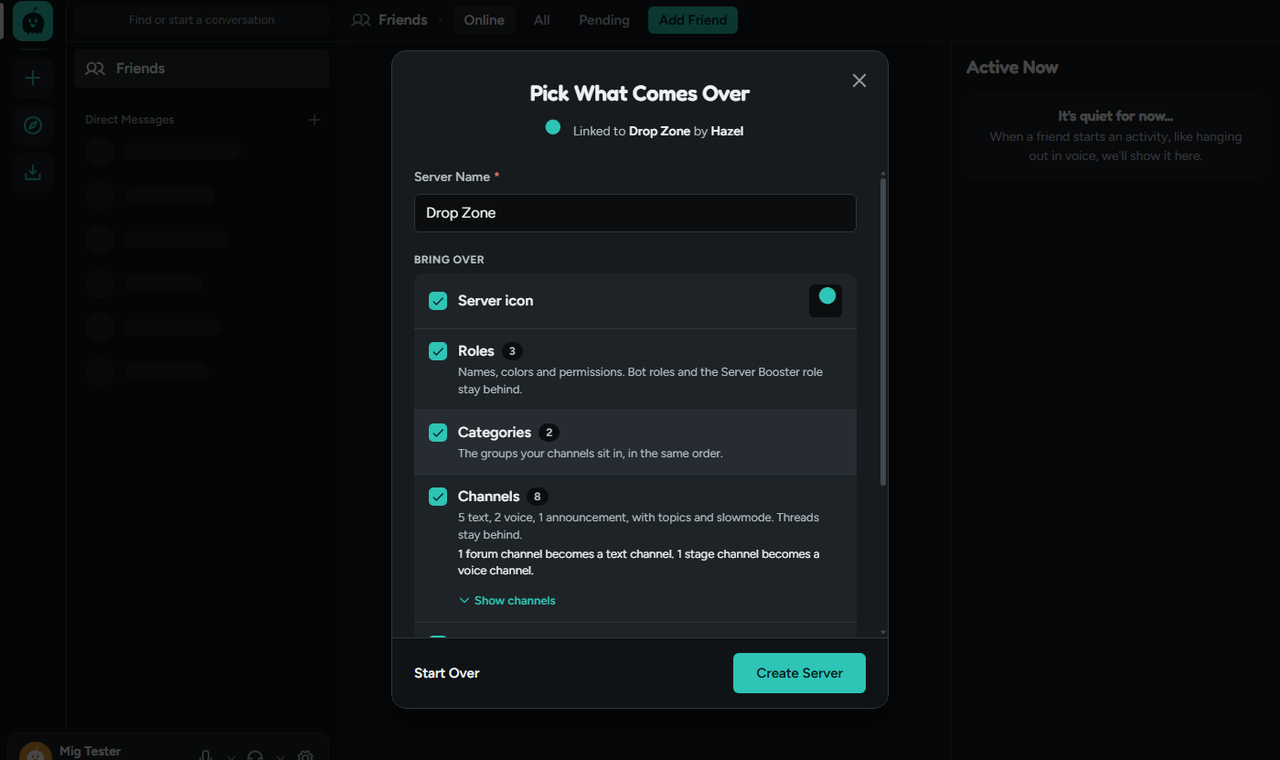
What comes over, and what stays
You choose each part before anything is built.
Comes over
- The server name and icon
- Roles, with their colors, order and permissions
- Categories and channels in the same order: text, voice, announcement, stage and forum channels
- Channel topics, slowmode and age-restricted channels
- Channel permissions for each role
- Up to 150 custom emoji, still and animated
- Forum tags
Stays on Discord
- Messages and their history
- Members (they join with your invite link)
- Threads and forum posts
- Bots and their roles
- Permissions set for one person instead of a role
Members get their Discord roles back
A migrated server remembers which Discord role each role came from. When members join, they can click Get my Discord roles in the server menu, link their Discord account, and get the roles they have on Discord. Roles from bots and boosting are skipped, and Administrator roles only come back if the owner turns that on.
After the move
The new server is yours like any other: rename channels, change permissions, add bots from the App Directory or build your own. Every member brings two free boosts, so a server of seven people can reach level 3, with 300 emoji slots and 100 MB uploads.
Own a Discord server with 1,000 or more members? Move it and apply to the Partner Program: your new server is Partnered with 14 boosts right away, and keeps both for good once 100 people join within 30 days.
New here? See what you get for free and how baff.gg compares with Discord.
Questions people ask
- Can I move my Discord server to baff.gg?
- Yes. Migrate a Server copies your Discord server’s channels, categories, roles, permissions, icon and up to 150 custom emoji into a new baff.gg server. It takes a few minutes.
- Does it copy my messages?
- No. The baff.gg bot never reads messages, so your history stays on Discord. Members join the new server with an invite link.
- Does migrating change or delete my Discord server?
- No. It only reads the setup. The bot asks for no permissions and leaves your Discord server once the move is done, cancelled or expired.
- Who can migrate a server?
- Anyone with the Manage Server permission on the Discord server, since that’s who can run /migrate there. You need a baff.gg account, and a verified email to bring the icon and emoji.
- Do members get their Discord roles back?
- Yes. In a migrated server, members can link their Discord account and get the roles they hold on Discord. Roles that come from bots or boosting are skipped, and Administrator roles only come back if the owner allows it.
- How long do I have?
- After you get a code you have 30 minutes to run /migrate, then 60 minutes to pick what comes over. If the code runs out, nothing is copied and you can start again.